Developer reference

Single Image Right

Split block with copy on the left and a supporting image on the right.

Content Blocks blockProduction documentation pageSource file: single-image-right.mjmlCopyable MJML and compiled HTML

Tags: image · split · right · marketing

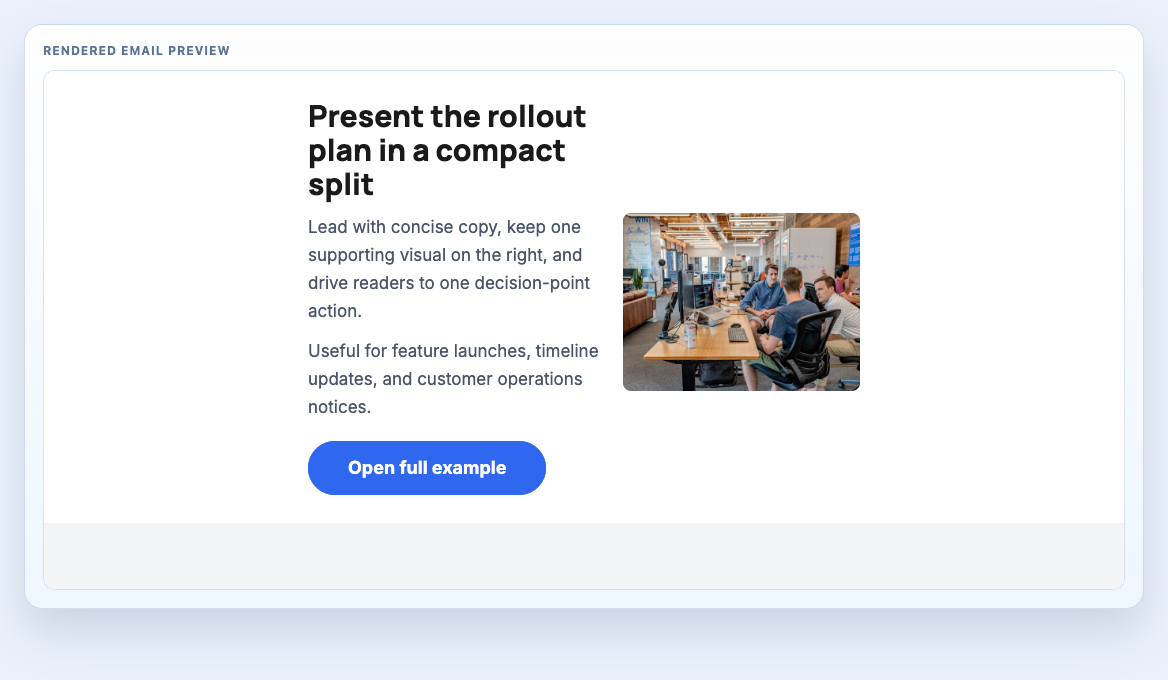
Rendering screenshot

Single Image Right rendering screenshot

Preview frame reflects current component rendering and real spacing proportions for production email QA.

Live preview

Rendered component preview

This preview is rendered from compiled HTML output so you can inspect the actual email structure, not a static mock-up.

Rendered email preview

Client support

Compatibility

4 clients

Rendering support notes across major email clients.

Single Image Right compatibility matrix
ClientStatusNotes
Gmail (Web + Mobile)TestedTwo-column split collapses cleanly on mobile.
Outlook Desktop (Windows)PartialImage and text columns can stack earlier in narrow Outlook panes.
Apple Mail (macOS + iOS)TestedNo additional notes.
Yahoo MailTestedNo additional notes.

Used in layouts

Where this block appears in production layout systems

These layout pages include this component in context, with block order, message structure, and QA guidance alongside the rendered email.

Related blocks

Continue building

These components are closely related by category or usage pattern and are useful when assembling a full email flow.

Source code

Copy the code you need

The source and compiled HTML shown below map directly to the rendered preview above. This keeps preview, MJML, and HTML handoff output aligned.

Snippet assembly: place this block inside the same <mj-body> as your other snippets, then stack sections in send order.

MJML snippet

Component block only. Use this when assembling an email from multiple reusable sections inside a project that already includes the shared MJML classes.

<mj-wrapper padding="0" full-width="full-width" />
      <mj-section padding="28px 34px" />
      <mj-column padding="0" />
      <mj-image padding="0 0 14px 0" />
      <mj-text padding="0 0 12px 0" font-size="16px" line-height="28px" color="#1a1a1a" />
      <mj-button padding="0" font-size="16px" font-weight="700" border-radius="999px" inner-padding="14px 30px" />

      <mj-class name="h1" font-size="42px" line-height="46px" font-weight="800" />
      <mj-class name="h2" font-size="36px" line-height="40px" font-weight="800" />
      <mj-class name="h3" font-size="30px" line-height="34px" font-weight="800" />
      <mj-class name="h4" font-size="26px" line-height="30px" font-weight="800" />
      <mj-class name="h5" font-size="22px" line-height="26px" font-weight="800" />
      <mj-class name="h6" font-size="20px" line-height="24px" font-weight="800" />
      <mj-class name="h1-display" font-size="56px" line-height="60px" font-weight="800" />
      <mj-class name="body" font-family="'Inter', Arial, sans-serif" font-size="17px" line-height="28px" />
      <mj-class name="small" font-family="'Inter', Arial, sans-serif" font-size="14px" line-height="23px" />
      <mj-class name="label" font-family="'Inter', Arial, sans-serif" font-size="12px" font-weight="700" text-transform="uppercase" letter-spacing="0.12em" />
      <mj-class name="bold" font-weight="700" />
      <mj-class name="extrabold" font-weight="800" />
      <mj-class name="white" color="#ffffff" />
      <mj-class name="light" color="#94a3b8" />
      <mj-class name="medium" color="#4a5568" />
      <mj-class name="dark" color="#1a1a1a" />
      <mj-class name="text-primary" color="#1a1a1a" />
      <mj-class name="text-muted" color="#4a5568" />
      <mj-class name="thblue" color="#2f67ef" />
      <mj-class name="whitebg" background-color="#ffffff" />
      <mj-class name="superlightbg" background-color="#f8fafc" />
      <mj-class name="thbluebg" background-color="#2f67ef" />
      <mj-class name="blackbg" background-color="#0f172a" />
      <mj-class name="darkbg" background-color="#102447" />
      <mj-class name="rocketbluebg" background-color="#183b7a" />
      <mj-class name="e3bluebg" background-color="#183b7a" />
      <mj-class name="transbg" background-color="transparent" />
      <mj-class name="badge" font-family="'Inter', Arial, sans-serif" font-size="12px" line-height="16px" font-weight="700" letter-spacing="0.12em" text-transform="uppercase" />
      <mj-class name="button" font-weight="700" />
    </mj-attributes>
    <mj-style>
      .border-top-light { border-top: 1px solid rgba(26, 26, 26, 0.1) !important; }
      .border-bottom-light { border-bottom: 1px solid rgba(26, 26, 26, 0.1) !important; }
      .grayscale img { filter: grayscale(100%); }
    </mj-style>
    
    <mj-raw>
      <meta name="color-scheme" content="light dark" />
      <meta name="supported-color-schemes" content="light dark" />
      <link rel="preconnect" href="https://fonts.gstatic.com" crossorigin />
      <link href="https://fonts.googleapis.com/css2?family=Manrope:wght@400;600;700;800&family=Inter:wght@400;500;600;700&display=swap" rel="stylesheet" />
    </mj-raw>
  </mj-head>
  <mj-body background-color="#f3f4f6">
<!-- #-START-# Single Image Right -->
<mj-wrapper mj-class="whitebg">
  <mj-section>
    <mj-column vertical-align="middle" width="55%" padding="0 10px">
      <mj-text mj-class="h3 text-primary extrabold" align="left" padding-bottom="12px">Present the rollout plan in a compact split</mj-text>
      <mj-text mj-class="body text-muted" align="left" padding-bottom="12px">Lead with concise copy, keep one supporting visual on the right, and drive readers to one decision-point action.</mj-text>
      <mj-text mj-class="body text-muted" align="left" padding-bottom="20px">Useful for feature launches, timeline updates, and customer operations notices.</mj-text>
      <mj-button background-color="#2f67ef" color="#ffffff" border-radius="50px" inner-padding="16px 40px" font-family="'Inter', Arial, sans-serif" font-size="18px" font-weight="700" href="https://templatehedgehog.co.uk" align="left" padding-bottom="0">Open full example</mj-button>
    </mj-column>
    <mj-column vertical-align="middle" width="45%" padding="25px 10px 0 10px">
      <mj-image src="https://images.unsplash.com/photo-1556761175-b413da4baf72?w=600&h=450&fit=crop&q=85" fluid-on-mobile="true" align="right" alt="Team reviewing release delivery timeline" border-radius="8px" />
    </mj-column>
  </mj-section>
</mj-wrapper>
<!-- #-END-# Single Image Right -->

Compiled HTML snippet

Component-only compiled markup for block-level inspection and HTML assembly workflows.

<!-- #-START-# Single Image Right -->
      <table
         align="center" border="0" cellpadding="0" cellspacing="0" role="presentation" style="background:#ffffff;background-color:#ffffff;width:100%;"
      >
        <tbody>
          <tr>
            <td>
              
        
      <!--[if mso | IE]><table align="center" border="0" cellpadding="0" cellspacing="0" class="" role="presentation" style="width:640px;" width="640" bgcolor="#ffffff" ><tr><td style="line-height:0px;font-size:0px;mso-line-height-rule:exactly;"><![endif]-->
    
        
      <div  style="margin:0px auto;max-width:640px;">
        
        <table
           align="center" border="0" cellpadding="0" cellspacing="0" role="presentation" style="width:100%;"
        >
          <tbody>
            <tr>
              <td
                 style="direction:ltr;font-size:0px;padding:0;text-align:center;"
              >
                <!--[if mso | IE]><table role="presentation" border="0" cellpadding="0" cellspacing="0"><tr><td class="" width="640px" ><table align="center" border="0" cellpadding="0" cellspacing="0" class="" role="presentation" style="width:640px;" width="640" ><tr><td style="line-height:0px;font-size:0px;mso-line-height-rule:exactly;"><![endif]-->
    
      
      <div  style="margin:0px auto;max-width:640px;">
        
        <table
           align="center" border="0" cellpadding="0" cellspacing="0" role="presentation" style="width:100%;"
        >
          <tbody>
            <tr>
              <td
                 style="direction:ltr;font-size:0px;padding:28px 34px;text-align:center;"
              >
                <!--[if mso | IE]><table role="presentation" border="0" cellpadding="0" cellspacing="0"><tr><td class="" style="vertical-align:middle;width:314.6px;" ><![endif]-->
            
      <div
         class="mj-column-per-55 mj-outlook-group-fix" style="font-size:0px;text-align:left;direction:ltr;display:inline-block;vertical-align:middle;width:100%;"
      >
        
      <table
         border="0" cellpadding="0" cellspacing="0" role="presentation" width="100%"
      >
        <tbody>
          <tr>
            <td  style="vertical-align:middle;padding:0 10px;">
              
      <table
         border="0" cellpadding="0" cellspacing="0" role="presentation" style="" width="100%"
      >
        <tbody>
          
              <tr>
                <td
                   align="left" style="font-size:0px;padding:0 0 12px 0;padding-bottom:12px;word-break:break-word;"
                >
                  
      <div
         style="font-family:'Manrope', 'Inter', Arial, sans-serif;font-size:30px;font-weight:800;line-height:34px;text-align:left;color:#1a1a1a;"
      >Present the rollout plan in a compact split</div>
    
                </td>
              </tr>
            
              <tr>
                <td
                   align="left" style="font-size:0px;padding:0 0 12px 0;padding-bottom:12px;word-break:break-word;"
                >
                  
      <div
         style="font-family:'Inter', Arial, sans-serif;font-size:17px;line-height:28px;text-align:left;color:#4a5568;"
      >Lead with concise copy, keep one supporting visual on the right, and drive readers to one decision-point action.</div>
    
                </td>
              </tr>
            
              <tr>
                <td
                   align="left" style="font-size:0px;padding:0 0 12px 0;padding-bottom:20px;word-break:break-word;"
                >
                  
      <div
         style="font-family:'Inter', Arial, sans-serif;font-size:17px;line-height:28px;text-align:left;color:#4a5568;"
      >Useful for feature launches, timeline updates, and customer operations notices.</div>
    
                </td>
              </tr>
            
              <tr>
                <td
                   align="left" style="font-size:0px;padding:0;padding-bottom:0;word-break:break-word;"
                >
                  
      <table
         border="0" cellpadding="0" cellspacing="0" role="presentation" style="border-collapse:separate;line-height:100%;"
      >
        <tbody>
          <tr>
            <td
               align="center" bgcolor="#2f67ef" role="presentation" style="border:none;border-radius:50px;cursor:auto;mso-padding-alt:16px 40px;background:#2f67ef;" valign="middle"
            >
              <a
                 href="https://templatehedgehog.co.uk" style="display:inline-block;background:#2f67ef;color:#ffffff;font-family:'Inter', Arial, sans-serif;font-size:18px;font-weight:700;line-height:120%;margin:0;text-decoration:none;text-transform:none;padding:16px 40px;mso-padding-alt:0px;border-radius:50px;" target="_blank"
              >
                Open full example
              </a>
            </td>
          </tr>
        </tbody>
      </table>
    
                </td>
              </tr>
            
        </tbody>
      </table>
    
            </td>
          </tr>
        </tbody>
      </table>
    
      </div>
    
          <!--[if mso | IE]></td><td class="" style="vertical-align:middle;width:257.4px;" ><![endif]-->
            
      <div
         class="mj-column-per-45 mj-outlook-group-fix" style="font-size:0px;text-align:left;direction:ltr;display:inline-block;vertical-align:middle;width:100%;"
      >
        
      <table
         border="0" cellpadding="0" cellspacing="0" role="presentation" width="100%"
      >
        <tbody>
          <tr>
            <td  style="vertical-align:middle;padding:25px 10px 0 10px;">
              
      <table
         border="0" cellpadding="0" cellspacing="0" role="presentation" style="" width="100%"
      >
        <tbody>
          
              <tr>
                <td
                   align="right" style="font-size:0px;padding:0 0 14px 0;word-break:break-word;"
                >
                  
      <table
         border="0" cellpadding="0" cellspacing="0" role="presentation" style="border-collapse:collapse;border-spacing:0px;" class="mj-full-width-mobile"
      >
        <tbody>
          <tr>
            <td  style="width:237px;" class="mj-full-width-mobile">
              
      <img
         alt="Team reviewing release delivery timeline" src="https://images.unsplash.com/photo-1556761175-b413da4baf72?w=600&h=450&fit=crop&q=85" style="border:0;border-radius:8px;display:block;outline:none;text-decoration:none;height:auto;width:100%;font-size:13px;" width="237" height="auto"
      />
    
            </td>
          </tr>
        </tbody>
      </table>
    
                </td>
              </tr>
            
        </tbody>
      </table>
    
            </td>
          </tr>
        </tbody>
      </table>
    
      </div>
    
          <!--[if mso | IE]></td></tr></table><![endif]-->
              </td>
            </tr>
          </tbody>
        </table>
        
      </div>
    
      
      <!--[if mso | IE]></td></tr></table></td></tr></table><![endif]-->
              </td>
            </tr>
          </tbody>
        </table>
        
      </div>
    
        
      <!--[if mso | IE]></td></tr></table><![endif]-->
    
      
            </td>
          </tr>
        </tbody>
      </table>
    <!-- #-END-# Single Image Right -->

Full library

Need the entire system available offline

Public component pages are there for reference and one-off use. Template Hedgehog Pro is for teams that want the full archive, local source files, compiled HTML, and a quicker implementation handoff.

Why teams upgrade

  • Stop collecting blocks one page at a time
  • Keep the full MJML and compiled HTML archive locally
  • Speed up implementation, review, and delivery across projects